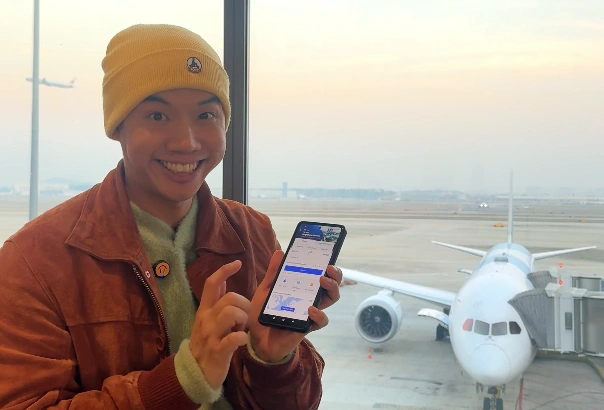
Travel can be unpredictable — from sudden gate changes to last-minute schedule shifts. That’s where the Trip App becomes your real travel MVP. If you’ve ever stressed over Flight Delays, gate changes, missed announcements, or confusing airport screens, Trip app turns all that chaos into clarity. With real-time updates, smart alerts, and automatic itinerary tracking, Trip keeps your journey smooth even when the skies don’t cooperate.
- 🎥 Traveling Smarter? This Trip App Is A Game Changer For You
- 👤 So… Who Is Trip App For?
- 🌍 Why Modern Travelers Need the Trip App More Than Ever
- ✈️ When a Flight Delay Happens, Trip App Notifies You Instantly
- 🛫 Gate Changes Are No Longer a Surprise
- 🧳 Where’s Your Baggage? Trip Tells You.
- 📱 How Trip Makes Your Journey Smoother
- 🌟 Why Smart Travelers Choose Trip
- ✨ Start Traveling Smarter
- 🔗 Helpful Links
🎥 Traveling Smarter? This Trip App Is A Game Changer For You
👤 So… Who Is Trip App For?

Short answer: Travelers like you and me.
Long answer: Anyone who wants less stress and more adventure.
Whether you’re a backpacker chasing sunsets, a business traveler racing between meetings, or a casual holiday-goer who just wants things to go smoothly — Trip is built for you.
🌍 Why Modern Travelers Need the Trip App More Than Ever

Travel today moves fast — and so do unexpected changes. Whether you’re catching a short domestic hop or rushing through a tight international connection, one delay can throw everything off. That’s where the Trip app comes in, giving travelers real-time information exactly when they need it.
As someone who travels frequently for content creation, I’ve tested so many travel apps… and Trip consistently stands out. The difference? It doesn’t just show your booking — it manages your entire journey.
✈️ When a Flight Delay Happens, Trip App Notifies You Instantly
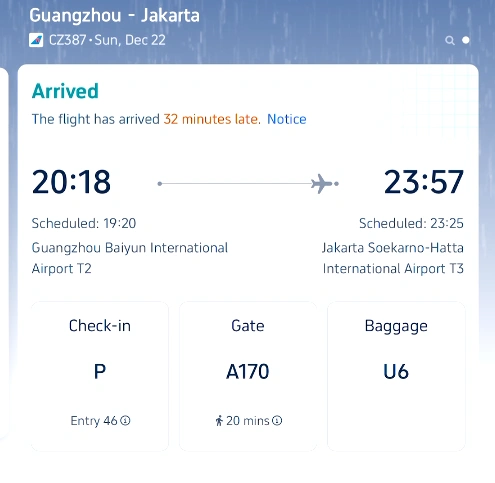
The biggest problem during delays is uncertainty.
Airlines often update boards late, announcements are unclear, and when you have a connecting flight… panic kicks in.
But with the Trip app flight delay alerts, you get a clear notification before most travelers even notice something is wrong:
- “Your flight is delayed.”
- “Would you like to change to another flight?”
You can switch options directly inside the app — no queueing at the counter, no calling customer service, no stress.
This alone saves you time, energy, and sometimes your entire trip.
🛫 Gate Changes Are No Longer a Surprise


Airports change gates more often than we realize, and most travelers find out only when they walk to the wrong one.
Trip fixes that with automatic updates:
- Check-in gate
- Boarding gate
- Transfer gate
- Any last-minute changes
You’ll always know where to go, and you’ll never be that traveler running across the terminal again.
🧳 Where’s Your Baggage? Trip Tells You.
After landing, Trip also informs you which carousel your luggage will arrive at. No more squinting at confusing screens or asking staff repeatedly.


For long flights or tight schedules, this small detail makes a big difference.
📱 How Trip Makes Your Journey Smoother
The Trip app keeps everything in one place:
- Flight tickets
- Live status updates
- Delay notifications
- Gate and airport info
- Baggage claim numbers
- Rebooking options
You can monitor your entire journey through a single screen. Simple, organized, and stress-free.
🌟 Why Smart Travelers Choose Trip

Traveling isn’t just about the destination — it’s about having tools that keep the journey smooth.
Trip reduces stress, prepares you for changes, and saves you from surprises at airports.
If you want a travel app that truly supports you from takeoff to landing, Trip is the one I personally rely on.
✨ Start Traveling Smarter
Ready to make your trips easier?
You’ll get a smoother, faster, smarter travel experience—just like I do.
That’s it for this blog post! If you found this helpful, give it a thumbs up! See you in the next post! Love you all! Thank you!
As Always, Live the Moments, and Follow the Trails.✈️🍜🔥🌏
Bye Bye!
Follow Leotrails for more exciting adventures and travel tips!